*****

Prompt with Purpose...

Get better AI images in fewer attempts!

The Biggest LIE in AI Image Generation...

Most people think they're bad at prompting.

They're not.

They're using the wrong tool for the wrong job.

That's why one prompt creates a stunning image in Midjourney...

...then produces complete garbage in GPT Image.

It's why someone on Instagram posts an incredible infographic and you spend an hour trying to recreate it.

It's why you burn credits. Waste time. Get frustrated.

And quietly wonder if everyone else knows something you don't.

They do.

But it's not what you think.

The difference isn't talent. It isn't creativity. It's not even just prompting.

The difference is understanding that AI image generation has split into four completely different games.

And each game has its own rules.

Once you see those rules...

You can't unsee them.

Real-World Examples from the prompts you'll get in this training!

Real-World Examples from the prompts you'll get in this training!

Real-World Examples from the prompts you'll get in this training!

Real-World Examples from the prompts you'll get in this training!

Real-World Examples from the prompts you'll get in this training!

Instructor

Want to Save the Most on 2026 Courses?

Enroll once and get every multi-module course* including this one released in 2026! (12+ courses!) Payment plans available.

CLICK HERE to Learn More

The Moment Everything Changed.

A few years ago, learning one image tool was enough.

Today?

That's like learning how to use a hammer and assuming you're ready to build a house.

  • Midjourney 8.1 has become the king of style consistency.
  • GPT Image 2 dominates infographic creation and art direction.
  • Nano Banana 2 solved problems most image models still struggle with.
  • And Grok Imagine's Agent can generate entire coordinated image campaigns from a single brief.

The problem?

Most people are trying to use all four the same way.

That's why they're getting average results from extraordinary tools.

Here's The Insight That Changes Everything

You don't need better prompts.

You need better prompt categories.

Think about it.

A professional photographer doesn't use one lens for every shot.

A master chef doesn't use one spice for every recipe.

And a serious AI creator doesn't use one prompting strategy for every image platform.

The highest performers know exactly:

  • Which tool to use.
  • When to use it.
  • What prompt structure works best.
  • And what mistakes instantly destroy results.

Once you understand that...

The entire industry becomes easier.

Not harder.

This is for people who are tired of being impressed by AI and ready to start controlling it. This is for YOU...

  • Authors.
  • Designers.
  • Marketers.
  • Course creators.
  • Entrepreneurs.
  • Content creators.
  • Anyone who wants professional-level visual output without spending years becoming a designer.

Because the goal isn't to become an AI image expert.

The goal is to create expert-level images.

There's a difference.

The 3-Module System

This is the end of prompt guessing.

Module 1: Midjourney 8.1

Master SREF codes, moodboards, and style controls to create consistent, professional-quality images on demand.

Module 2: GPT Image 2

Create stunning infographics, art-directed visuals, and polished designs using proven prompt frameworks.

Module 3: Nano Banana 2 & Grok Imagine

Generate accurate text-in-image designs, powerful infographics, and entire coordinated image series from a single brief.

What Happens After You Learn This?

Imagine sitting down with an image idea and already knowing:

"That's a Midjourney job."

Or:

"GPT Image will handle this better."

Or:

"Grok can create the entire series in one shot."

Instead of guessing...

You decide.

Instead of re-rolling...

You direct.

Instead of hoping...

You know.

That's the real outcome...

Certainty.

Downloadable Prompt Guides for Every AI Model!

BONUS: Steal Our Prompts!

Get the exact prompts behind every example in the course and model your success from day one!

✨ Your Next Step

The AI image space is moving faster than almost any technology shift we've seen.

Every month the gap widens between creators who understand these systems... And creators who are still guessing.

One group is building assets, brands, products, campaigns, books, courses and businesses. The other group is generating pictures.

The question isn't whether AI image generation matters.

That battle is already over.

The only question is whether you'll learn how to direct these tools...

Or continue letting them direct you.

ENROLL NOW!

FAQ

  • Do I need to be technical to use this course?

    No. If you can type a sentence, you can use these frameworks. Everything is taught step-by-step with real examples.

  • Do I need access to all four AI image tools?

    No. You can start with the tools you already use and expand from there. The strategies are organized by platform so you can jump straight to what's relevant. (Or use EMAI to switch between most of them!)

  • Will I get the actual prompts used in the course?

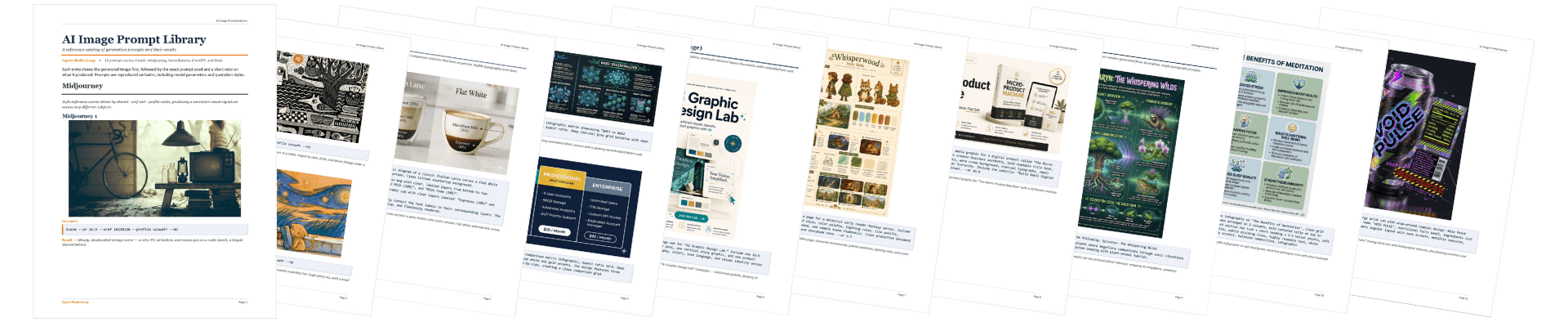
    Yes. You'll get the exact prompts used throughout the course, the images they generated, and an explanation of why they worked, so you can confidently adapt the same strategies to your own projects. Plus, you'll receive FOUR complete Prompt Guides packed with even more proven prompts than those demonstrated in the training.

  • Will this work inside EMAI?

    Yes! All the strategies can be used inside EMAI's apps and the AI Chat feature. The only model not included in EMAI is Midjourney, but the strategies will still work.

Course Syllabus

Module 1

Introduction
Lesson 1 - Midjourney 8.1 Overview
Lesson 2 DEMO - Create an Image
Lesson 3 DEMO - Settings Overview
Lesson 4 DEMO - Create a Basic Video
Lesson 5 DEMO - Creating "Very Strong/Subtle" Variations of an Image
Lesson 6 DEMO - Explore Mode
Lesson 7 DEMO - How to Find Related SREF Codes to a Style You Like
Lesson 8 DEMO - How to Fine-Tune a Style with SREF Codes
Lesson 9 DEMO - Change the Style but Keep the Object or Scene Theme Intact
Lesson 10 DEMO - Style Creator
Lesson 11 DEMO - Mood Boards
Lesson 12 DEMO - Blend SREF Codes & Mood Boards
Lesson 13 - Quick Break: Tour Tony's Midjourney Outputs
Lesson 14 - Using Image References
Lesson 15 - Describe Image & Dial in Your Image Prompts
Lesson 16 - Using Personalization
Lesson 17 - Organize Feature (View Images Fast)

Lesson 18 -  Edit Images Feature

Module 1 Bonuses
Video: All Lessons in One Video
Module 1 Q&A
Module 1 Slides

Module 2

Introduction & Lesson 1 - GPT Image 2 Overview
Lesson 2 DEMO - Premium Product Ad Design (Example: Herbal Tea)
Lesson 3 DEMO - Magazine Cover Design
Lesson 4 DEMO - Infographic Design
Lesson 5 DEMO - Character Consistency Sheet (Example: For Professional Animation)
Lesson 6 DEMO - Food Photography
Lesson 7 DEMO - Historical Travel Poster Design (Example: Vintage 1930s)
Lesson 8 DEMO - Brand Identity Board Design
Lesson 9 DEMO - Premium Non-Fiction Book Cover Design
Lesson 10 DEMO - App Icon Set Design
Lesson 11 DEMO - User Interface Mockup Design (for App Development & Websites)
Lesson 12 DEMO - Retouch & Colorize Old Images
Lesson 13 DEMO - Storyboard Design for an Animated Short + Video Example
Lesson 14 DEMO - Physical Product Design Mockup (Example: Oracle Deck)
Lesson 15 DEMO - Image Edits inside GPT Image 2
Lesson 16 DEMO - Seamless Pattern Design (Example: Wallpaper, Fabric)
Lesson 17 DEMO - Digital Product Mockup Design (Example: Course, App, Book, Deck, etc.)
Lesson 18 DEMO - 2-Page Spread Magazine Design Mockup
Lesson 19 DEMO - Visual Character & Story Style Bible + Editing Tricks
Lesson 20 DEMO - Infographic Showing a Process (Example: AI Creator Pathway)
Lesson 21 DEMO - Save Time & Money with EMAI's AI Chat

Module 2 Bonuses
Video: All Lessons in One Video
Module 2 Q&A, Personal Stories & Insights
Module 2 Slides

Module 3

Introduction & Lesson 1 - Nano Banana 2 Overview
Lesson 2 DEMO - 3-Panel Graphic Novel Sequence
Lesson 3 DEMO - App Interface Design (Example: When AI Fails)
Lesson 4 DEMO - Ingredient Ratios Infographic Design (Example: Espresso Drinks)
Lesson 5 DEMO -  Isometric City Image Creation (Example: Tokyo with Current Weather Conditions)
Lesson 6 DEMO - Clean Modern Infographic Design (Example: Egyptian Tomb Blueprint)
Lesson 7 DEMO - Edit an Existing Image (Example: Sunny Suburbia to Cinematic Cyberpunk Night)
Lesson 8 DEMO - Horizontal Comparison Grid Graphic (Example: Pricing Plans)
Lesson 9 DEMO - Standard Image Generation (Example: Detective in Neo-Tokyo)
Lesson 10 DEMO - Overhead Product Shot Image Creation (Example: Photographer's Equipment on a Table; Botany)
Lesson 11 - Grok Imagine Pro Overview
Lesson 12 DEMO - Infographic Design (Examples: Benefits of Meditation; Complex Periodic Table; AI vs. Human Creativity)
Lesson 13 DEMO - Book Cover Design (Example: Fantasy Fiction)
Lesson 14 DEMO - Grok Edit Features (Example: Changing the Book Cover Character)
Lesson 15 DEMO - Resume Design
Lesson 16 DEMO - Website Design Mockup
Lesson 17 DEMO - Grok Agent Mode (Examples: World Builder; Story & Character Generation; Current Events Infographics)
Lesson 18 DEMO - Grok Image to Video Generation
Lesson 19 DEMO - Save Time & Money with EMAI's Multi-Modal AI Chat
Lesson 20 DEMO - Ideogram 4 Image Generation

Module 3 Bonuses
Video: All Lessons in One Video
Module 3 Q&A
Module 3 Slides

Course Bonuses

BONUS PDFs: AI Image Prompt Libraries

About

Meet Your Expert Instructor

Hi there! Tony Laidig here... I’m known as The Public Domain Expert, but what I really do is help creators like you unlock limitless potential through AI and public domain content... without the overwhelm.

I’ve been experimenting with AI writing and art tools since before they were cool (back in 2018), and over the last 18+ years, I’ve designed more than 600 book covers, including several that landed on the New York Times Best-Seller list.

My goal? To make creativity more accessible, more profitable, and way more fun!

If you’ve ever felt stuck trying to figure out how to create books, products, or art that actually stand out, I’ve probably built a course or strategy to help. I’ve taught over 2,000 course modules covering everything from publishing and book design to AI-generated art, children’s books, video content, and beyond.

And while I love teaching and creating, I live what I teach... traveling the country in an RV with my wife Kristen and our two cats, making art, writing, and capturing inspiration with my camera wherever we roam.

If you're ready to explore powerful tools, timeless content, and scalable creative strategies, you're in the right place!